

Introduction
When a pull signal misfires in a just-in-time facility, there's no buffer inventory to buy time. Materials arrive exactly when needed, every production step depends on the one before it, and a single automation failure can stop the line within minutes.
Workflow automation keeps this system running: coordinating pull signals, supplier communications, work order routing, and shift handoffs without constant manual oversight. The stakes are high. Unplanned downtime costs industries an estimated $50 billion annually, and JIT's zero-buffer design means a failed automation trigger hits production immediately.
This guide covers how to diagnose, fix, and prevent the most common JIT workflow automation failures — with specific steps for identifying root causes before applying any fix.
Key Takeaways
- Most JIT automation failures trace back to five categories: demand signal errors, supplier communication breakdowns, bottleneck detection failures, shift handoff gaps, and exception-handling dead ends
- Correct root cause diagnosis before fixing prevents symptom masking and costly recurrence
- Undocumented tribal knowledge is a leading but underestimated root cause — gaps in encoded logic surface as failures no one can explain
- In JIT environments, prevention is non-negotiable — buffer inventory doesn't exist to absorb operational errors
What Workflow Automation Actually Does in JIT Manufacturing
The Lean Enterprise Institute defines JIT production as making only what is needed, when it is needed, in the amount needed. Pull production — where downstream activities signal their needs upstream — is one of its three core components.
Workflow automation in this context means using integrated software, real-time signals, and rule-based or AI-driven logic to orchestrate materials, work orders, and supplier communications without manual intervention at each stage.
That orchestration relies on a defined architecture. The ISA-95/IEC 62264 standard connects three layers into a coherent data flow:
- ERP (enterprise systems) — schedules, orders, and supplier communications
- MES (manufacturing operations management) — work order execution and production tracking
- Shop-floor control — equipment signals and operator actions
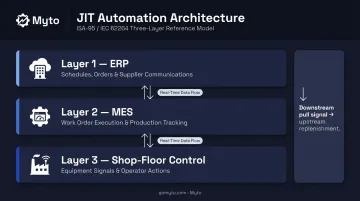
In a well-configured JIT environment, these layers communicate continuously so that a downstream pull signal automatically triggers upstream replenishment.
The stakes here are not symmetric. When automation works, it eliminates waste and keeps the line moving. When it breaks down, there's no safety stock to absorb the gap. That's what makes issue resolution in JIT environments both time-critical and high-stakes — and why getting the diagnosis right before applying a fix matters so much.
Common Workflow Automation Failures in JIT Manufacturing
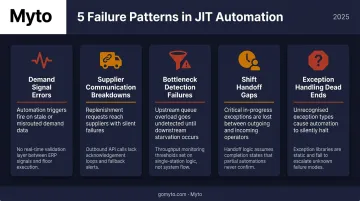
Most automation failures follow recognizable patterns — and in JIT environments, they tend to fall into five categories.
Demand Signal and Inventory Sync Failures
Symptoms:
- Pull signals not triggering replenishment orders
- Inventory counts in the system don't match the physical floor
- Production schedules shift but upstream systems aren't updated
Likely cause: Integration lag between ERP and MES, stale data from infrequent sync cycles, or reorder thresholds set for batch manufacturing rather than JIT's low-inventory norms. As ASCM notes, high inventory inaccuracy rates lead directly to unexpected back orders and higher operational costs.
Supplier Communication Workflow Breakdowns
Symptoms:
- Automated purchase orders or delivery alerts fail to send
- Supplier acknowledgments aren't captured in the system
- Parts arrive late with no advance warning
Likely cause: Broken API connections between procurement systems and supplier portals, or workflow triggers that depend on manual data entry steps that were skipped.
Production Bottleneck Detection Failures
Symptoms:
- The system doesn't flag a slowing workstation
- Downstream steps proceed before the upstream component is ready, causing pile-ups or stoppages
Likely cause: Monitoring logic not calibrated to JIT cycle times, or machine sensor data not feeding into the automation layer in real time.
Shift Handoff and Knowledge Transfer Breakdowns
Symptoms:
- Incoming operators restart tasks already in progress
- Teams escalate issues the previous shift already resolved
- Context-critical steps are missed because the outgoing operator handled them informally
Likely cause: Automation workflows assume standardized, documented handoff procedures that don't exist. In practice, critical context lives in operators' heads — and when it doesn't transfer, the next shift starts blind. OSHA research on process safety consistently identifies communication failures at shift transitions as a primary contributor to operational incidents.
Exception Handling Dead Ends
Symptoms:
- When something unexpected occurs — a part defect, machine alarm, supplier delay — the workflow stalls and waits for manual intervention
- That intervention may not arrive within JIT-compatible response windows
Likely cause: Exception-handling logic is absent or too rigid, with no defined escalation paths for conditions that fall outside the expected flow. Workflows built without real-world variance in mind break the moment conditions change.
Why JIT Workflow Automation Breaks Down: Root Causes
Most JIT automation failures trace back to the same four root causes — and each one is preventable once you know what to look for.
Undocumented Tribal Knowledge Not Encoded in Automation Rules
This is the most common root cause that operations teams overlook. Experienced operators carry decades of process knowledge — how a specific machine sounds before a bearing fails, how to handle a particular exception without stopping the line — and almost none of it is formally documented.
The Manufacturing Institute and Deloitte project that U.S. manufacturers may need up to 3.8 million new employees by 2033, with 1.9 million jobs potentially remaining unfilled. When experienced operators retire or leave, the informal knowledge embedded in automation assumptions disappears with them. The system then fails in ways nobody anticipated — because the rules were never written down.
Solving this requires capturing expertise in the flow of work — not after the fact. Platforms like Myto address this directly by using wearable AI glasses to record how skilled operators actually troubleshoot and hand off shifts, then automatically converting that footage into SOPs and automation logic. Informal expertise becomes encoded before it leaves the facility.
System Integration Failures Between ERP, MES, and Floor-Level Systems
JIT automation depends on reliable data exchange between systems that were often purchased separately and integrated imperfectly. Gartner predicts that by 2027, more than 70% of recently implemented ERP initiatives will fail to fully meet their original business goals — a significant risk for operations relying on ERP-to-MES data flows as pull signal infrastructure.
Even a few minutes of lag between an ERP pushing orders and an MES receiving them can break a pull-based production signal in a zero-buffer environment. The ISA-95 standard defines how these layers should communicate — but configuration gaps between the standard and actual implementation are common.
Misconfiguration for JIT-Specific Operational Demands
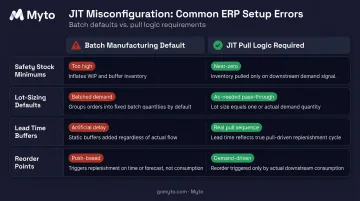
Many automation tools were originally configured for batch manufacturing. Safety stock thresholds, lot-sizing defaults, and lead time buffers that make sense in batch environments actively create errors in JIT operations.
Pull logic requires fundamentally different trigger conditions than push logic. Automation that was never reconfigured for JIT will generate wrong signals at the wrong times — often without any visible error that would prompt investigation.
The most common misconfiguration issues in JIT transitions include:
- Safety stock minimums set too high, triggering unnecessary replenishment orders
- Lot-sizing defaults that batch demand signals instead of passing them through as-needed
- Lead time buffers that add artificial delay into pull sequences
- Push-based reorder points that override demand-driven logic
Insufficient Real-Time Feedback and Monitoring
JIT automation requires continuous floor-level visibility. When automation is built on batch data collection — periodic reports, manual scan cycles, infrequent system syncs — the entire issue detection and response chain is delayed.
In JIT environments, late detection has nearly the same impact as no detection.
How to Resolve JIT Workflow Automation Issues: Step-by-Step
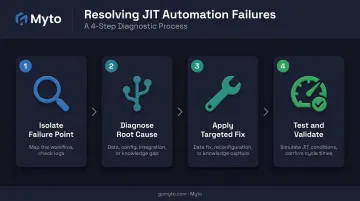
Resolving automation failures without a structured diagnostic process leads to one of two outcomes: symptom masking that causes recurrence, or unnecessary system overhauls. These four steps ensure the right fix gets applied to the right problem.
Step 1: Isolate the Exact Failure Point
Map the workflow that failed — from trigger to expected output — and identify precisely where execution stopped or produced the wrong result.
- Check system logs, error queues, and operator reports
- Determine whether the failure is in a trigger condition, a data input, an integration handoff, or an output action
- Document the failure pattern: consistent, intermittent, tied to specific shifts, high-demand periods, or specific product variants
Step 2: Diagnose the Root Cause Category
Determine whether the failure is primarily:
- A data integrity issue — bad or missing inputs
- A configuration issue — rules that don't match JIT pull logic
- An integration issue — system handoff failure between ERP, MES, or floor systems
- A knowledge gap issue — undocumented process not captured in automation logic
Rule out external factors first (supplier system outages, API timeouts, sensor malfunctions) before concluding the automation logic itself is at fault.
Step 3: Apply the Targeted Fix
For data or integration failures:
- Verify API connections and sync schedules
- Correct data mapping errors
- Adjust sync frequency to match JIT cycle times
- Implement real-time data feeds where batch processing is causing lag
For configuration or logic errors:
- Revisit trigger conditions, threshold settings, and routing rules
- Recalibrate parameters to JIT-specific values rather than legacy batch manufacturing defaults
- Test all configuration changes in a staging environment before pushing to production
For knowledge or handoff gaps: Work directly with experienced operators to surface the informal steps, decision rules, and exception behaviors missing from automation logic. Encode these into structured SOPs and updated workflow rules.
Myto's platform addresses this directly. Operators wear AI glasses and keep working as usual; the glasses record the troubleshooting steps, equipment maneuvers, and handoff behaviors that were never documented. Captured footage syncs automatically to Myto's AI platform, which structures it into version-controlled SOPs, troubleshooting flows, and shift handover documentation.
Those outputs then feed into agentic AI agents domain-trained on the plant's own operational data — closing the loop between undocumented expertise and automated workflow logic.
For exception-handling dead ends:
- Design escalation paths for each unhandled exception type
- Add conditional logic for the most common unexpected scenarios
- Assign clear human-in-the-loop checkpoints for edge cases that can't be fully automated
Step 4: Test and Validate Under JIT Conditions
- Run the repaired workflow through simulated and then live JIT production conditions
- Specifically include the edge cases that triggered the original failure
- Monitor trigger-to-action timing and downstream system responses for a defined period before declaring the issue resolved
- Confirm that cycle time performance meets JIT requirements
Fix vs. Overhaul: When to Patch vs. Rebuild
Not every automation failure warrants a full system overhaul. But some signal a fundamental mismatch between the automation architecture and JIT operational requirements — and patching these will only delay a larger failure.
Patch the existing system when:
- The failure is isolated to a single workflow, integration point, or configuration parameter
- The underlying system architecture is sound
- The issue was triggered by a known change — new supplier, product changeover, system update — and can be resolved with targeted reconfiguration
Replace or rebuild the automation layer when:
- Multiple workflows are failing simultaneously or sequentially
- The system was designed for batch manufacturing and cannot be reconfigured to support pull-based JIT logic without fundamental restructuring
- Knowledge gaps are systemic and the current system has no mechanism for capturing or encoding frontline expertise over time
The NIST-hosted MESA Manufacturing Operation Management Maturity Assessment Tool provides a structured framework for this evaluation. Its Quick assessment mode can help operations teams get a maturity-level baseline before deciding between patch and rebuild.
If that baseline reveals systemic knowledge gaps, the rebuild case becomes clear — and that's where Myto fits. Myto layers on top of existing MES, ERP, SCADA, and CMMS systems rather than replacing them. Teams can add intelligence and automation capability without disrupting systems of record or lifting existing infrastructure.
Preventing Future JIT Workflow Automation Failures
Prevention in JIT environments is structurally necessary. The following practices reduce both failure frequency and severity.
Establish continuous knowledge capture. Document how operators actually handle exceptions, complete handoffs, and troubleshoot issues — not the idealized version, but what happens on the floor. Myto's platform ingests captured footage and floor-level data as operators work, building a knowledge layer that compounds in value over time.
Conduct regular automation audits calibrated to JIT cycle times. Don't audit annually. Align review cadence with production changes — any product changeover, new supplier, or staffing shift should trigger an automation review checkpoint covering trigger conditions, integration health, and exception logs.
Build real-time monitoring into the automation infrastructure. Machine data, operator inputs, and floor-level events should feed into the automation system continuously. Set alert thresholds that match JIT's zero-buffer tolerances. Define escalation protocols so exceptions reach the right person within a JIT-compatible response window.
Treat SOPs as living documents. The Lean Enterprise Institute defines standardized work as the foundation for continuous improvement through kaizen. When SOPs don't reflect how work actually happens, automation logic built on top of them will fail. Keep them current or the whole system drifts.
Frequently Asked Questions
How do you automate manufacturing processes?
Start by mapping existing workflows to identify repetitive, rule-based tasks, then integrate systems (ERP, MES, sensors) to handle triggers and outputs automatically. Effective automation requires documented processes as its foundation — automation built on undocumented assumptions fails when conditions change.
What is the just-in-time (JIT) manufacturing process?
JIT is a lean production philosophy where materials arrive exactly when needed, minimizing inventory and waste. Because there's no buffer stock, any disruption — from a missed supplier delivery to a scheduling error — hits production immediately.
What is the future of JIT manufacturing?
JIT is evolving toward AI-assisted automation, real-time supply chain visibility, and smarter exception handling. A growing priority is capturing frontline operational knowledge digitally to make JIT systems more resilient to workforce changes and supply chain volatility.
What are the most common causes of JIT workflow automation failures?
Most failures trace back to a few recurring problems:
- Tribal knowledge never encoded into automation rules
- Systems configured for batch manufacturing rather than pull-based JIT logic
- Integration lag between ERP and floor-level systems
- No real-time monitoring to match JIT's zero-buffer requirements
How does workflow automation improve JIT manufacturing efficiency?
In JIT environments, there's no inventory buffer to absorb delays — so speed and accuracy matter at every step. Automation addresses this by:
- Eliminating manual handoffs that slow pull signal response
- Reducing human error in demand-driven scheduling
- Enabling real-time exception detection before issues cascade
Can smaller manufacturers implement JIT workflow automation without heavy IT infrastructure?
Yes. Platforms like Myto are built for quick deployment with minimal IT lift — no heavy infrastructure required. The most successful rollouts start narrow: one production line or supplier workflow, grounded in documented operator knowledge, before expanding across the facility.