Introduction
AI troubleshooting systems have become frontline infrastructure in manufacturing — how fast your team gets a line back up when something fails depends directly on whether these systems work. When they do, hours of searching and waiting compress into minutes of guided resolution.
Unplanned downtime already costs the world's 500 largest manufacturers $1.4 trillion annually — roughly 11% of revenue. Average recovery time has climbed from 49 minutes in 2019 to 81 minutes in 2024, driven largely by skills and knowledge gaps on the floor. When the AI troubleshooting system itself breaks down, it adds to that recovery time rather than reducing it.
This guide walks through the four most common failure modes, their root causes, and a step-by-step resolution framework. Most problems don't require replacing your system — just diagnosing it correctly.
Key Takeaways
- Four core failure modes drive most AI troubleshooting breakdowns: inaccurate recommendations, unrecognized fault patterns, system latency, and knowledge gaps from operator turnover
- Most failures trace back to data quality, static knowledge bases, or broken integrations — the model itself is rarely the problem
- Fix sequence: identify the symptom → isolate the root cause category → apply the specific fix → validate with real fault conditions
- Replace only when the architecture can't support real-time floor demands or continuous knowledge capture
- AI troubleshooting systems degrade like equipment — they require ongoing maintenance, not one-time deployment
What Is AI Troubleshooting in Manufacturing?
AI troubleshooting in manufacturing refers to the use of AI agents, NLP-driven assistants, and knowledge-based systems to diagnose equipment faults, deliver repair procedures, and guide frontline workers to resolution — without waiting for a specialist or hunting through outdated binders.
These systems work by ingesting historical repair data, equipment logs, SOPs, and operator inputs, then delivering the most relevant guidance in real time when a fault or alarm occurs. Platforms like Myto go further with an Operational Data Integration layer that reads across your full operational stack:
- Machine logs and MES/SCADA data tied to specific equipment
- Maintenance tickets and CMMS records mapped to relevant SOPs
- ERP work orders and shift-handoff notes linked to active troubleshooting flows
This manufacturing-specific context is what separates a general AI assistant from a system that actually knows your floor.
The critical thing to understand about these systems: they are living operational tools, not static software. They require ongoing data quality, integration health, and knowledge capture to stay effective. Without maintenance, they degrade — just like the mechanical equipment they're built to diagnose.
Common Problems With AI Troubleshooting Systems
Most failures with manufacturing AI troubleshooting systems follow recognizable patterns. Identifying which pattern you're dealing with is the first step to rapid resolution.
Problem 1: AI Surfaces Inaccurate or Irrelevant Recommendations
Symptoms:
- Operators report getting wrong fix suggestions for known faults
- Recommended procedures don't match the actual machine or failure mode
- Trust erodes and workers stop consulting the system
Likely cause: The AI was trained on insufficient, outdated, or generic data — not specific to the actual machines, failure modes, or operating conditions at that facility. McKinsey identifies missing data points, broken sensors, and incomplete data mappings as the primary data-quality roadblocks for manufacturing AI. Rare failure modes get underrepresented in training sets, making the model confidently wrong on the faults that matter most. A system trained on generic industrial data — rather than your plant's specific operational history — will surface procedures that don't match your equipment configurations, maintenance intervals, or failure patterns.
Problem 2: AI Fails to Recognize New or Uncommon Fault Patterns
Symptoms:
- Alarms outside historical patterns always escalate without useful guidance
- Repeat failures go uncaptured and uncorrected
- The system handles common faults but provides nothing for edge cases
Likely cause: No active feedback loop exists to feed newly resolved incidents back into the model. The knowledge base is static — it only knows what was documented at launch. Equipment ages and processes shift, but the AI never learns from them.
Peer-reviewed bearing fault-diagnosis research addresses this: effective systems must continuously identify new unlabeled fault types, not just classify known patterns. Without a feedback mechanism, the gap between what the AI knows and what's actually happening on the floor widens with every modification.
Problem 3: System Latency or Unavailability During Production
Symptoms:
- AI response times are too slow during active fault conditions
- Operators abandon the tool under pressure and revert to tribal knowledge
- System goes offline during peak production demand
Likely cause: Cloud-dependent architecture with poor edge integration. The Industry IoT Consortium notes that industrial AI systems processing data remotely face bandwidth constraints that make real-time floor guidance unreliable. When an operator is standing in front of a failed machine, a 30-second wait for a recommendation isn't an inconvenience — it's a reason to stop using the system entirely.
Problem 4: Knowledge Gaps When Experienced Operators Leave
Symptoms:
- AI output quality degrades after key personnel turnover
- New workers receive no guidance for faults only senior operators previously handled
- The system can't troubleshoot edge cases that were never formally documented
Likely cause: The AI was never given a mechanism to capture tacit, undocumented knowledge from experienced operators. It only knows what was formally recorded. Deloitte and the Manufacturing Institute project the U.S. manufacturing skills gap could leave 2.1 million jobs unfilled by 2030. Every departure takes undocumented expertise with it unless a capture mechanism is already in place.
Why AI Troubleshooting Systems Fail (Root Causes)
These failures share a common thread: the AI only knows what it was given at the start, and the floor kept moving.
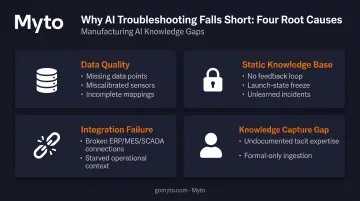
Root causes typically fall into one of four categories:
| Category | What Goes Wrong |
|---|---|
| Data quality | Missing data points, miscalibrated sensors, incomplete mappings — bad inputs produce bad outputs |
| Static knowledge base | No feedback loop means newly resolved incidents never improve the model |
| Integration failure | Broken connections to ERP, MES, SCADA, or machine logs starve the system of live operational context |
| Knowledge capture gap | Tacit expertise from senior operators was never ingested — the AI only knows what made it into formal documentation |
An idle automotive production line costs $2.3 million per hour in lost output. The Siemens/Senseye data connecting longer recovery times to workforce knowledge gaps is not an abstract concern — it's a direct operational cost. An AI troubleshooting system that's degraded or ignored extends every downtime event rather than compressing it.
Left unaddressed, these root causes compound. Operators lose confidence in the system and stop using it. That disuse accelerates knowledge erosion — and the next incident takes even longer to resolve than the last.
How to Fix AI Troubleshooting System Issues (Step-by-Step)
Attempting to fix an AI troubleshooting system without isolating the root cause category first leads to wasted effort. Retraining a model when the real issue is a broken data pipeline solves nothing.
Step 1: Identify the Exact Problem
Gather direct evidence before touching anything:
- Pull specific outputs the AI gave versus what the correct resolution actually was
- Collect timestamps showing when latency spiked or the system went offline
- Review incident logs for fault types the system consistently failed to resolve
Then talk to frontline operators. They've observed the failure modes more clearly than any dashboard will show. Whether the problem is inaccuracy, slowness, or gaps in coverage — operators will tell you directly.
Step 2: Confirm the Root Cause Category
Determine whether the issue is primarily:
- Data quality — bad inputs, outdated procedures, facility-specific gaps
- Model/knowledge base — insufficient training or a static knowledge base that stopped learning at launch
- Infrastructure — latency, uptime failures, broken API connections
- Operational — the system was never set up to capture evolving operator knowledge
Rule out external factors before touching the model. Confirm that data pipelines from machines, ERP, and maintenance logs are intact and feeding the system correctly. A broken data feed is a faster fix than a model retrain, and it's easy to mistake one for the other.
Step 3: Apply the Correct Fix Based on Root Cause
If the problem is data quality: Audit the training dataset for gaps, outdated procedures, and facility-specific accuracy. Clean, update, and supplement with real incident histories from that specific production environment. Generic industrial data won't substitute for plant-specific operational history.
If the problem is a static knowledge base: Establish a feedback loop so every resolved incident is captured and added back into the AI's knowledge. The system should learn from every fault it encounters, not just the ones it was trained on months ago. A knowledge base that stops updating at launch loses accuracy with every process change, shift rotation, and equipment upgrade that follows.
If the problem is infrastructure or integration: Resolve API failures, move latency-sensitive processing closer to the edge, and test system availability under simulated peak production loads before returning to active use.
If the problem is knowledge gaps from undocumented operator expertise: Standard retraining can't fix a knowledge base that was never populated with tacit expertise in the first place. This requires capturing how experienced operators actually troubleshoot — the diagnostic steps, equipment maneuvers, and judgment calls that never made it into documentation.
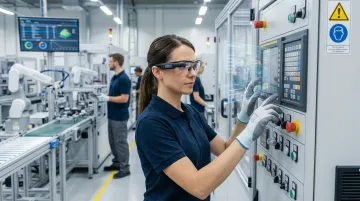
Platforms like Myto address this through wearable AI glasses that record operator activity hands-free on the floor. That footage is automatically structured into SOPs, troubleshooting flows, and training content that feeds back into the platform, with no extra burden on the operator.
Step 4: Test and Validate the Fix
- Simulate real fault conditions against the updated system
- Measure recommendation accuracy, response time, and coverage across both common and uncommon fault types
- Monitor operator adoption post-fix — if workers are still bypassing the AI, the technical root cause may be resolved but the trust gap isn't
If operators are still bypassing the system, run brief walkthroughs on the floor showing exactly what changed and how it handles the fault types they complained about. Seeing the system correctly diagnose a problem they've struggled with in person closes the trust gap faster than any rollout memo.
When Should You Fix vs. Replace Your AI Troubleshooting System?
Most manufacturing AI troubleshooting systems don't need to be replaced — they need better data, better integrations, and a genuine connection to the knowledge that actually exists on the floor. But some architectures are fundamentally mismatched with production demands.
Fix the system when:
- Data quality and coverage are the primary issue
- The underlying architecture supports real-time integration and a feedback learning loop
- The system is under-trained for the specific facility, not structurally broken
Replace the system when:
- The architecture is cloud-only with no edge capability and cannot meet real-time floor response requirements
- There is no mechanism to capture evolving operator knowledge and the vendor has no roadmap to add one
- The system was built for a different use case and retrofitted — creating chronic performance gaps that patches can't close
- The cumulative cost of workarounds and repeated retraining cycles exceeds the investment in a manufacturing AI platform built for the job
That last trigger is especially relevant in high-turnover environments. When a senior technician retires and the system has no way to capture what they knew, every retraining cycle starts from zero — and the cost compounds each time.
Preventive Measures to Keep AI Troubleshooting Running Reliably
The most expensive AI troubleshooting failure is the one that hits during an unplanned stoppage. Letting AI systems drift — outdated knowledge bases, broken data feeds, undertrained operators — creates the same failure modes as skipping machine PM.
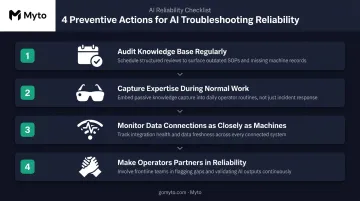
Four actions that prevent the most common failures:
Audit the knowledge base regularly — Compare AI recommendations against resolved incidents quarterly or after major process changes. Retire outdated procedures and add new failure modes as equipment ages. The NIST AI Risk Management Framework requires ongoing test, evaluation, verification, and validation across the AI lifecycle — not just at deployment.
Capture expertise during normal work, not after — Formal documentation alone isn't enough. Systems like Myto use AI glasses to record how experienced operators actually troubleshoot, hands-free, so that knowledge feeds back into the platform without adding steps to anyone's workflow.
Monitor data connections as closely as machines — A broken feed from ERP, MES, SCADA, or machine logs degrades AI recommendations just as a bad sensor degrades machine output. Treat these integrations as critical infrastructure, not background IT concerns.
Make operators partners in system reliability — When frontline teams understand that their input improves AI accuracy, they engage more and flag errors faster. That feedback loop is what keeps the system sharp over time.
Conclusion
Most AI troubleshooting failures in manufacturing are resolvable. The key is diagnosing the actual root cause category — data, model, infrastructure, or knowledge capture — before acting, then applying the fix that matches the problem rather than defaulting to generic retraining.
The long-term reliability of any AI troubleshooting system depends on continuous knowledge capture. A system frozen at its launch state will always degrade as equipment ages, processes shift, and experienced operators leave. One that continuously learns from how the best operators actually work retains each resolution — so the next technician who faces the same fault starts with the answer, not from scratch.
Frequently Asked Questions
Can AI do troubleshooting?
Yes. AI troubleshooting systems analyze equipment data, match fault patterns to historical resolutions, and guide operators through repair steps in real time. In manufacturing, systems trained on facility-specific operational data — machine logs, SOPs, and captured operator expertise — can significantly reduce both diagnosis time and overall downtime duration compared to manual lookups or waiting for a specialist.
What are the most common reasons AI troubleshooting systems fail on the factory floor?
The four core failure modes are: inaccurate recommendations from poor or generic training data; inability to recognize new fault patterns due to static knowledge bases with no feedback loop; latency or availability issues from cloud-only architecture with poor edge integration; and knowledge gaps created when experienced operators leave without their expertise being captured.
How do I know if my AI troubleshooting system needs to be replaced or just reconfigured?
If the core architecture supports real-time integration and feedback learning, the system can usually be fixed through data quality improvements and targeted retraining. Replacement is warranted when the architecture is cloud-only with no path to edge deployment, or when there's no mechanism to capture evolving operator knowledge and the vendor has no roadmap to add one.
How long does it take to retrain an AI troubleshooting agent for manufacturing?
Timelines depend on data availability and the scope of retraining needed. Systems with well-maintained historical incident data can be updated in days to a few weeks. Systems that never captured tacit operator expertise may need several weeks of structured knowledge ingestion first — the model can only perform as well as what it was taught.
Can AI troubleshooting systems work without historical repair data?
Yes, but initial recommendations will be poor. The fix is bootstrapping through structured operator knowledge capture while establishing a feedback loop from day one — so every resolved incident starts building the knowledge base immediately.
How do I prevent AI troubleshooting failures from causing production downtime?
Monitor data pipeline health and recommendation accuracy on a regular schedule, capture knowledge from experienced operators before they leave, and audit AI coverage against the fault types your facility actually encounters. Treat the system as operational infrastructure that requires ongoing maintenance, not a one-time deployment.